HomeBlogBlogFoldable Adjustable Stand for iPhone & iPad (4.7–11)

Foldable Adjustable Stand for iPhone & iPad (4.7–11)

Foldable Adjustable Stand for iPhone & iPad (4.7–11)

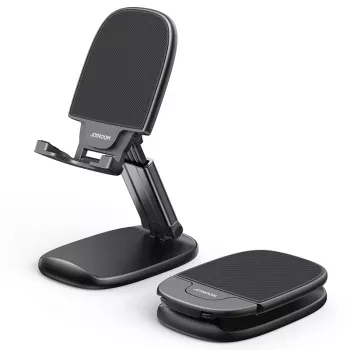
Adjustable Foldable Phone & Tablet Stand for Apple Devices (4.7″–11″)

A compact stand can make daily Apple device use more comfortable—whether it’s a FaceTime call, a recipe on the counter, or a second screen next to a Mac. This adjustable, foldable stand is designed to support iPhones and iPads in the 4.7″–11″ range while staying easy to pack, set up, and reposition throughout the day.

What This Stand Helps With Day to Day

Using an iPhone or iPad flat on a table often means craning your neck, constantly picking the device up, or dealing with a screen that slides around whenever you tap. A dedicated stand solves those small annoyances that add up across work, home, and travel.

  • Keeps your iPhone or iPad upright for video calls, streaming, reading, or quick notification visibility.
  • Reduces neck strain by raising the screen closer to eye level compared with laying a device flat.
  • Makes tapping, swiping, and typing steadier than holding a device in-hand for longer sessions.
  • Works well as a travel-friendly desk accessory thanks to its foldable profile.
  • Useful in shared spaces (kitchen counter, bedside table, office desk) where quick repositioning matters.

If you bounce between rooms during the day, the fold-and-go design makes it easy to treat your stand like a daily carry accessory rather than a permanent desktop fixture.

Compatibility With iPhone and iPad (4.7″–11″)

The sweet spot for this stand is the most common Apple device range: iPhones starting around 4.7 inches and iPads up to 11 inches. That covers everyday setups from a smaller iPhone used as a bedside clock to an 11-inch iPad used for study, recipes, or Sidecar.

  • Designed for Apple devices within a common size range, covering many iPhone and iPad models up to 11 inches.
  • Supports both portrait and landscape positioning for calls, watching, Split View workflows, and reading.
  • Consider case thickness: bulky rugged cases may require extra clearance on the device lip (especially for smaller phones).
  • Works well with iPad mini and iPad Air/Pro 11-class devices when placed on a stable surface.
  • For best stability with larger tablets, place the stand on a flat, non-slippery surface and keep the hinge fully seated.

Quick Compatibility Checklist

Device Type Typical Use What to Check Before Buying
iPhone (4.7″ and up) FaceTime, streaming, bedside clock Case thickness; portrait/landscape comfort
iPad mini Reading, notes, travel media Grip depth at the bottom lip; table stability
iPad (up to 11″) Second screen, recipes, study Hinge stability on a flat surface; typing angle preference

If you’re not sure which iPad size you have, Apple’s official model comparison pages can help you confirm screen size before you buy: Apple — iPad models and specifications.

Adjustability and Viewing Comfort

Angle control is what turns a basic holder into something you’ll actually use daily. A small change in tilt can improve eye contact on calls, reduce glare from overhead lights, and make tapping feel more stable.

  • Angle adjustment helps match eye level when seated, reducing the tendency to hunch over a screen.
  • A lower, steeper angle is often better for tapping and short typing; a higher angle is better for video calls.
  • Landscape orientation can feel more stable for video playback, while portrait is ideal for reading and chatting.
  • If using with an external keyboard, set the stand higher to keep the screen closer to eye height.
  • For long sessions, pair with a supportive chair setup and keep the screen centered in front of you.

For an iPad used as a second screen, the goal is simple: keep it high enough that your eyes move naturally between displays without repeated neck flexing.

Foldable Design for Travel, Work, and Small Spaces

Common Apple-Centric Use Cases

  • FaceTime calls: keeps the camera stable at a natural angle and reduces shaky handheld movement.
  • Sidecar/second-screen workflows: places an iPad near a Mac for quick glances (great for chat, notes, or reference material). Apple’s Sidecar setup guide is here: Apple Support — Use Sidecar to connect a Mac and iPad.
  • Kitchen mode: holds an iPhone or iPad for timers, recipes, and hands-free playback while cooking.
  • Study and note-taking: supports reading on iPad while writing on paper or typing on a keyboard.
  • Content creation: steady framing for recording, teleprompter-style reading, or monitoring.

Setup Tips for Stability and Charging

Product Snapshot

At-a-Glance Details

Item Detail
Product Adjustable Foldable Phone & Tablet Stand for Apple Devices (4.7″–11″)
Device range 4.7″–11″
Portability Foldable
Availability In stock
Price $15.67 USD

More In-Stock Picks to Round Out Your Setup

FAQ

Will it fit an iPhone or iPad with a case on?

Most standard cases should work as long as the bottom lip can accommodate the added thickness. For the best fit, make sure the device sits centered and doesn’t wobble when you tap.

Is it stable enough for an 11-inch iPad?

It can be stable on a flat surface when the base is fully opened and the iPad is centered on the support lip. Larger tablets typically feel more secure at slightly lower angles with gentler tapping.

Can it be used in landscape mode for watching videos?

Yes, landscape mode is a common setup for streaming and Split View. Adjust the hinge so the device’s center of gravity stays over the base, especially with bigger iPads.

Was this article helpful?

Yes No
Leave a comment
Top

Shopping cart

×